Key Takeaways
- Ditch the weekly-check habit — most small business sites only need to search for backlinks once a month unless you’re mid-campaign or recovering from a penalty.
- Start with Google Search Console before paying for anything. It won’t show every backlink, but it’s the free method that tells you exactly what Google itself has indexed.
- Compare tools before you commit. Ahrefs backlink checker, Moz DA checker, and a solid DR checker each score authority differently, so pulling numbers from just one tool can mislead your strategy.
- Run competitor research through Semrush backlink analytics or the Semrush free backlink checker to find link opportunities your own site is missing entirely.
- Build a repeatable backlink audit checklist — new links gained, lost links, and referring domain quality — instead of randomly refreshing a checker every few days.
- Catch toxic links early. A quick monthly scan with a free backlink checker extension or Moz spam score checker can flag risky links before they drag down your search engine position.
Every day, thousands of site owners open a backlink checker, refresh the report, and panic over nothing. Ten new links? Great. Two lost links? Cue the spiral. Here’s the uncomfortable truth: most advice telling you to search backlinks every single week is built for agencies chasing vanity metrics, not for a founder trying to grow a real business.
Google itself doesn’t recalculate your authority overnight, and neither should your monitoring habit. A former Google search quality tester will tell you flatly — link data moves in cycles, not minutes. Checking too often wastes hours you could spend earning links instead of watching them. Checking too rarely means toxic domains sit there quietly dragging down your position.
So what’s the right cadence? It depends on your site’s size, its link velocity, and whether you’re actively running outreach campaigns. Get that timing wrong, and you’ll either burn out on data or miss the exact moment a spammy referring domain starts hurting your ranking. Get it right, and your backlink checker becomes a genuine growth tool instead of a source of anxiety.
Why “Check Weekly” Is Bad Advice for Most Websites
A SaaS founder we worked with checked her backlink profile every Monday morning for six months. Nothing changed most weeks — same referring domains, same DR score, same handful of new links trickling in. She burned hours she should’ve spent on outreach. That’s the trap. A blanket weekly schedule to search backlinks assumes every site grows links at the same pace — that’s just not true.
The Real Factors That Determine Your Backlink Check Frequency
Frequency should match link velocity, not the calendar. A site running active outreach or digital PR campaigns might earn 10-15 new links a month — that warrants biweekly checks. A quiet local business site picking up two links a quarter doesn’t need more than a monthly glance. Competitive niches with aggressive rivals also justify tighter monitoring, since rapid shifts in a competitor’s backlink count can signal a new campaign worth studying.
What Happens When You Over-Monitor Your Link Profile
Constant checking creates noise, not insight. Founders start reacting to normal fluctuation — a lost link here, a new spammy referral there — instead of tracking real trend lines. This is exactly what backlinking strategies reveal about whether an seo program can scale: programs built on panic-checking rarely last, while ones built on steady, spaced-out review cycles compound results over time.
How to Search Backlinks Using Google Search Console (Free Method)
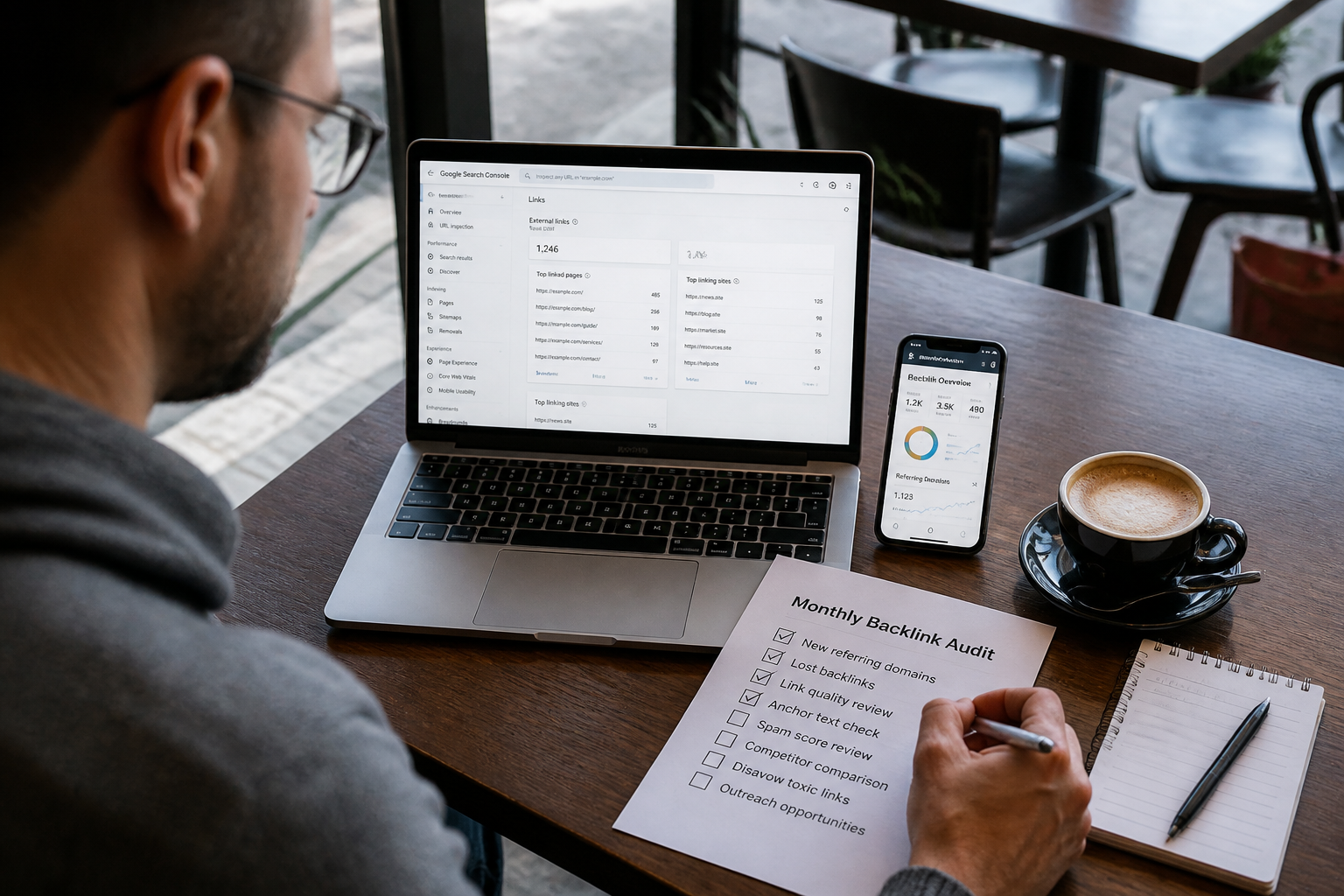
Google Search Console won’t cost you a dime, and it’s the one tool pulling data straight from the engine’s own index. Open Links in the left sidebar, and you’ll see “top linking sites” pulled directly from Google Search Console. It’s not a backlink checker in the traditional sense — it only reports links Google has actually crawled and indexed, which is exactly why it’s worth using alongside other tools.
Reading Your Google Backlink Data Without Getting Overwhelmed
Don’t try to review every row. Sort by “top linking sites” first, then check anchor text distribution below it. Founders often panic when they see a spike in unfamiliar domains — most of the time it’s harmless, low-authority chatter, not a penalty risk. If a pattern of spammy links shows up repeatedly, that’s your cue to start real backlink building to dilute the bad with the good.
Where Search Console Falls Short Compared to Paid Tools
Here’s the catch: Search Console shows no domain authority score, no spam score, no historical trend line. It won’t tell you a link’s traffic value or referring domain rank. For that level of analysis, you’ll eventually need Ahrefs, Moz, or Semrush data. And once your technical foundation is solid, how a backlink building service supports startups after technical seo is complete becomes the next logical move.
Free Backlink Checker Tools Worth Actually Using
Which tool actually deserves a spot in your bookmarks bar? Not every free backlink checker gives you accurate data, and some cap results so hard they’re barely useful for real research.
Ahrefs Backlink Checker, Moz DA Checker, and DR Checker Compared
The ahrefs backlink checker shows referring domains, anchor text — a rough traffic estimate — solid for a quick gut check on any site. Pair that with a Moz DA Checker or a standalone DR Checker, and you get two different scoring systems side by side, which matters because DA and DR don’t always agree. Run a Moz spam score checker too. A site with high authority but a rising spam score is a link you don’t want anywhere near your profile. None of these tools are perfect on their own — that’s the point of cross-checking.
Ubersuggest, Linkody, and Other Free Backlink Checker Extensions
For lighter, ongoing monitoring, a Ubersuggest backlink checker or a Linkody free backlink checker works fine, and a browser-based backlink checker extension lets you check link data while you’re already on a competitor’s page. None of these replace a real strategy, though. If you’re serious about earning backlinks for website growth instead of just measuring them, it helps to boost your SEO with proven backlink building techniques built for compounding results, not one-off checks.
Semrush Backlink Analytics: What You Get From a Deeper Backlink Report
91% of pages on the web get zero backlinks, according to an Ahrefs study — which means the ones that do carry serious weight. That’s the whole point of Semrush backlink analytics: it doesn’t just count links; it grades them. You get referring domain trends, anchor text distribution, and toxic link flags in one report. Most founders check ranking position and stop there. Wrong move.
A real backlink report should show you which links are new, which ones dropped off — whether your competitor’s link velocity is outpacing yours. If you’re not tracking that monthly, you’re guessing.
DA PA Checker vs. Semrush Backlink Analytics: Which Score Matters More
Here’s the thing — a da pa checker gives you a quick, single-number snapshot. Fine for a gut check. But it won’t tell you why a page ranks or which specific links are pulling weight. Semrush’s deeper metrics (Authority Score, referring domain quality, traffic-by-page) matter more for actual strategy. DA/PA is a rumor. Semrush data is closer to evidence.
Using the Semrush Free Backlink Checker for Competitor Research
Run three competitors through the Semrush free backlink checker and compare their top linking domains against yours. If you’re consistently short, a backlink building service can close that gap faster than DIY outreach — and a solid backlink building company already has those relationships built.
Building a Backlink Check Schedule That Actually Improves Rankings
Here’s the myth: more frequent link checks equal faster ranking gains. Wrong. Checking daily just buries you in noise — what matters is a repeatable cadence tied to real changes in your link profile. A monthly backlink search paired with quarterly deep audits gives small sites enough signal without wasting hours staring at dashboards.
A Monthly Backlink Audit Checklist for Small Business Sites
Set aside 30 minutes a month for these steps:
- Pull fresh data from a free backlink checker or backlink checker extension
- Compare referring domain counts against last month’s report
- Flag new links with a DR checker or DA PA checker
- Note anchor text patterns that look manufactured
- Cross-check top pages in Google Search Console for unexpected link spikes
Small businesses considering outside help should know that are seo backlink services worth it for brands chasing faster organic growth depends entirely on whether the agency ties link work to conversion data, not just raw counts.
Spotting Toxic Links Before They Hurt Your Search Engine Position
Toxic links rarely announce themselves. Run a Moz spam score check alongside a rank tracker review — if rankings drop right after a batch of low-quality links appear, that’s your signal. Disavow aggressively, then re-check in 30 days. Realistically, most sites only need this level of scrutiny once a quarter, not every week.
Frequently Asked Questions
How do I search backlinks for free?
Run your domain through a free backlink checker like Ahrefs, Moz, or Semrush’s free backlink analytics tool. You’ll get a sample of referring domains, anchor text, and DR or DA scores without paying anything. Just know free reports are usually capped — full backlink checker access requires a paid plan.
What’s the best free backlink checker?
Ahrefs’ backlink checker is the most trusted for raw index size, but Semrush’s free backlink checker gives a cleaner overview for beginners. Moz’s link explorer is decent for DA/PA checks. Honestly, we tell clients to cross-check two tools before trusting any single report — no single index catches everything.
Can Google Search Console show me my backlinks?
Yes, to a degree. Google Search Console’s Links report shows top linking sites and pages, but it’s nowhere near as detailed as a dedicated backlink checker. Use it to confirm Google actually knows about a link — that’s the one thing third-party tools can’t guarantee.
How do I check backlinks of a competitor’s website?
Drop their domain into an ahrefs backlink checker, Semrush backlink analytics, or a moz backlink checker and pull their referring domains list. Sort by domain rating or spam score to spot which links are worth chasing. This is honestly the fastest way to build a link-building target list from scratch.
What’s the difference between DA, DR, and PA?
DA (Domain Authority) — PA (Page Authority) come from Moz; DR (Domain Rating) is Ahrefs’ version of the same idea. A DR checker and a da pa checker measure similar things — link strength — but the scores aren’t interchangeable across tools. Never compare a Moz DA score directly against an Ahrefs DR score; they use different data sets and math.
Is a backlink checker extension worth using?
For quick checks while browsing, yes. A backlink checker extension lets you see rough metrics for any page without leaving your browser tab. We use one daily for fast site audits, but for real reporting we still pull from the full tool dashboard.
How often should I search backlinks for my own site?
Check monthly at minimum, weekly if you’re actively running a link-building campaign. New backlinks can appear or disappear fast, and a spike in low-quality links deserves immediate attention. Set up alerts in Ahrefs or Semrush, so you’re not manually checking every time.
What counts as a high-quality backlink?
A link from a site with strong domain authority, relevant topic overlap, and real organic traffic. Editorial links placed naturally in content beat directory or forum links every time. If the referring site has a low spam score and decent traffic per Semrush or Ahrefs traffic checker data, that’s a good sign.
Does Moz Spam Score actually matter for SEO?
It matters more as a red flag than a ranking factor. A high Moz Spam Score checker result on your backlink profile usually means you’ve got toxic or low-quality links pointing at you, which can drag down trust with search engines. We recommend a quarterly link audit specifically to catch these before they cause damage.
Can I search backlinks without paying for Ahrefs or Semrush?
Yes — tools like Ubersuggest backlink checker — Linkody free backlink checker give usable, if limited, data at no cost. They won’t match Ahrefs’ index size, but for small business owners just starting link-building, they’re a reasonable starting point. Once your link profile grows, you’ll want the deeper reporting a paid subscription provides.
Here’s the honest takeaway: obsessing over a daily or weekly ritual to search backlinks does more harm than good for most site owners. A founder running a lean team doesn’t need another dashboard to check every morning — they need a system that flags actual problems. Google Search Console handles the basics for free. Semrush or Ahrefs earns its cost once a link profile grows past a few hundred referring domains and competitor research becomes part of the job.
What matters isn’t frequency — it’s whether the check leads to action. A toxic link caught in month one is cheap to remove. The same link ignored for a year can quietly drag down rankings that took months to build.
So skip the anxiety-driven daily scroll. Set a monthly audit, block 30 minutes, and actually read what the data’s telling you. That’s it. That’s the whole system.
Ready to stop guessing and start acting on real link data? Book a meeting with Profit Labs and get a backlink audit built around your site’s actual risk — not someone else’s arbitrary schedule.